How Robotics Operations Support Connected Industrial Workflows

September 22, 2026 · 19 reads
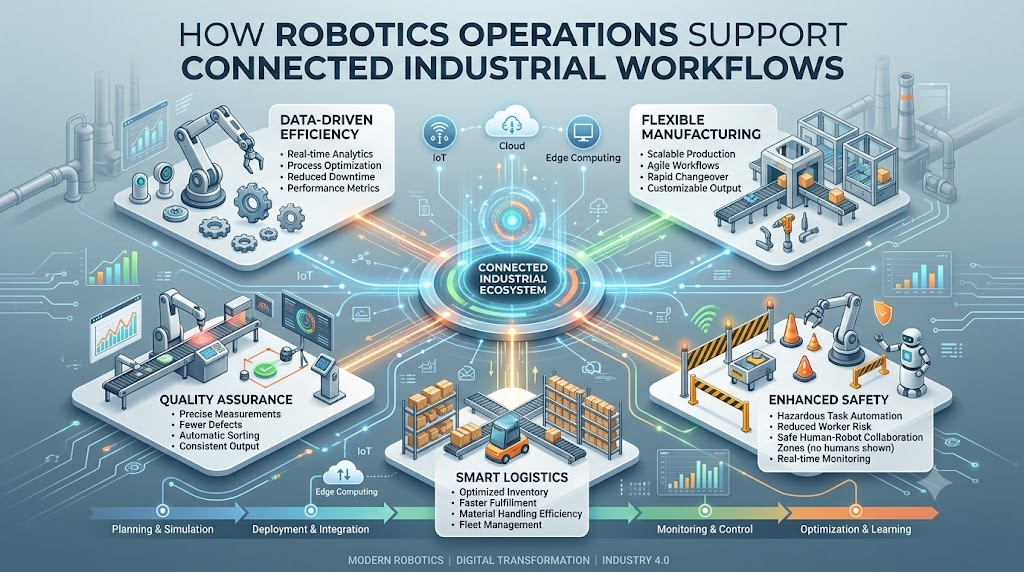
Picture this. A warehouse robot suddenly stops moving in the middle of an aisle. No one notices for twenty minutes. Orders pile up. A worker finally spots it and has to walk over, check the screen, and manually restart it. This happens more often than you’d think. And it’s exactly the kind of problem RobotOps tries to solve. RobotOps means using software practices, like monitoring, automation, and structured updates, to keep robots running reliably. It borrows ideas from DevOps, a method software teams use to build and manage apps smoothly, and applies them to physical robots instead. If you work with robots, or plan to, this is worth understanding.
Why RobotOps Matters
Robots don’t run themselves, at least not reliably, without some structure behind them. Without good practices, teams run into the same problems again and again.
Think about what tends to go wrong:
- Robots go offline and no one notices right away.
- A software update breaks something on ten robots instead of just one.
- Someone has to manually check each robot instead of watching them from one screen.
- Safety issues get caught late, after something already went wrong.
RobotOps exists to reduce these headaches. It’s not about replacing your team. It’s about giving them better visibility and fewer surprises. If you’ve ever felt like you’re constantly firefighting robot issues instead of preventing them, this is the gap RobotOps fills.
Who This Is For
This isn’t just for large robotics companies. It applies to anyone dealing with more than a handful of robots, or planning to scale up soon.
That includes robotics engineers building new systems, automation engineers keeping factory lines running, students learning how real robot deployments work, developers writing robot software, and manufacturing or logistics teams relying on robots daily.
If you’ve ever asked “how do we keep track of all these robots?”, you’re the audience for this.
Key Concepts You Should Know
A few terms come up constantly in this space. Let’s break them down simply.
Telemetry is data a robot sends out about itself, like battery level, motor temperature, or location. Think of it like a car’s dashboard, but for a robot.
Fleet management means treating a group of robots as one connected system instead of separate machines. You can learn more about how Robot Fleet Management works in practice and what it typically involves.
Robot lifecycle covers everything from a robot’s first deployment to its software updates, and eventually retirement. Tracking this helps you know exactly what version of software each robot runs.
Predictive maintenance uses data patterns to guess when a part might fail, before it actually breaks. It’s like noticing your car makes a new noise and getting it checked before it strands you on the highway.
Observability means having enough visibility into a system to understand what’s happening inside it, not just whether it’s on or off.
Incident management for robots is simply having a clear plan for what happens when something breaks. Who gets notified? What’s the first step?
Skills That Help You Work With RobotOps
You don’t need to master everything at once. But a few skills come up again and again:
- ROS 2 (Robot Operating System 2), a widely used set of tools that helps different robot parts, like sensors and motors, communicate with each other. It’s not an operating system in the traditional sense, more a structured way to connect robot components.
- Robotics middleware, software that acts as a translator between different parts of a robot’s system.
- Simulation tools, for testing robot behavior safely before using real hardware.
- Navigation and perception systems, which help a robot understand and move through its surroundings.
- Basic DevOps and automation practices, since much of RobotOps borrows directly from how software teams manage deployments.
A Simple Roadmap: From Simulation to Deployment
Here’s roughly how a careful team moves a new robot behavior from idea to real-world use.
- Build and test in simulation first. This means testing the robot’s behavior in a virtual environment, so mistakes don’t damage real equipment.
- Run small-scale real-world tests. Try the update on one or two robots, not the whole fleet.
- Monitor closely during rollout. Watch telemetry data for anything unusual.
- Roll out gradually. Expand to more robots only after the small test looks stable.
- Keep watching after full deployment. New issues sometimes show up only at scale.
- Review and document what happened. This makes the next update smoother.
Skipping steps here is how small bugs turn into fleet-wide problems.
Best Practices for Robot Fleet Management
A few habits separate smooth operations from constant chaos:
- Centralized monitoring. Watch every robot from one dashboard instead of checking each one separately.
- Remote diagnostics. Fix or investigate issues without walking over to the robot every time.
- Scheduled software updates. Predictable update cycles are easier to manage than random, urgent patches.
- Safety checks built into routines. Don’t treat safety as a one-time setup step.
- Incident response plans. Know in advance who does what when a robot fails or behaves unexpectedly.
None of this needs to be complicated. Even a simple shared spreadsheet is better than no plan at all, though dedicated tools help as you scale.
Common Mistakes to Avoid
Even experienced teams fall into a few repeat traps:
- Skipping simulation to save time, then dealing with a bigger mess after a failed real-world test.
- No centralized monitoring, so problems get discovered late, often by a frustrated coworker.
- Ignoring update cycles, letting robots run outdated or inconsistent software for too long.
- Treating safety as optional once a system “seems to work fine.”
- Not documenting incidents, so the same mistake happens again a few months later.
Most of these come down to skipping steps under time pressure. It’s understandable, but it usually costs more time later.
Tools and Platforms, Grouped by Purpose
There’s no single “best” tool here. It really depends on your use case, budget, and team’s existing skills. That said, tools generally fall into a few categories:
- Simulation tools – for testing robot behavior in a virtual environment before real-world use.
- Fleet monitoring platforms – for watching multiple robots from a central dashboard.
- Middleware frameworks – like ROS 2, for connecting different robot components together.
- Navigation systems – for helping robots move and avoid obstacles.
- Telemetry and data platforms – for collecting and analyzing the data robots send out.
A small startup with three robots has very different needs than a warehouse running two hundred. Start by matching tools to your actual scale, not the biggest name you’ve heard of.
What to Look For When Learning
If you’re trying to learn this space, not every course or tutorial is equally useful. Look for resources that include:
- Hands-on labs, not just slides and theory.
- Real robot or simulation projects, so you actually build something.
- Clear fundamentals first, like basic ROS 2 concepts, before jumping into advanced automation.
Learning RobotOps mostly by reading is hard. It clicks faster once you’ve actually broken something in simulation and had to fix it.
A Real-World Example
Here’s a simple, realistic scenario. A warehouse robot loses its network connection while moving inventory across the floor. Without centralized monitoring, no one notices until another worker physically finds it stuck in an aisle, blocking a path.
With proper fleet monitoring in place, the system would have flagged the disconnection immediately. A remote diagnostic check could confirm whether it’s a network issue or a hardware fault, and someone could respond before it becomes a bigger bottleneck.
This kind of gap, small on its own, but costly at scale, is exactly what RobotOps practices aim to close.
Simulation vs Real-World Testing
| Factor | Simulation | Real-World Testing |
|---|---|---|
| Risk of damage | Very low | Higher, involves real hardware |
| Cost per test | Lower, no physical wear | Higher, uses real equipment and time |
| Speed of iteration | Fast, can repeat quickly | Slower, needs setup each time |
| Realism | Good, but not perfect | Most accurate representation |
| Best used for | Early testing, catching obvious bugs | Final validation before full rollout |
Most solid workflows use both. Simulation first to catch the easy mistakes, then real-world testing to confirm things actually hold up outside a virtual environment.
FAQs
What is RobotOps in simple terms?
RobotOps means using software practices like monitoring and automation to keep robots running reliably. It borrows ideas from how software teams manage applications and applies them to physical robots.
How is RobotOps different from regular robotics engineering?
Robotics engineering often focuses on building and designing robots. RobotOps focuses on what happens after that, deploying, monitoring, and maintaining robots once they’re working.
What is Robot Fleet Management exactly?
It means managing multiple robots as one connected system instead of separate machines, usually through centralized monitoring and coordination tools.
Do I need to know ROS 2 to work in RobotOps?
It helps a lot, since ROS 2 is widely used to connect different robot components. But you can start learning RobotOps concepts before mastering it fully.
Why does simulation matter so much before real-world testing?
Simulation lets you catch mistakes safely, without risking damage to real robots or their surroundings. It’s much cheaper to fail in simulation than in the real world.
What causes most robot fleet problems?
Often it’s simple things: skipped simulation steps, no centralized monitoring, or inconsistent software updates across the fleet, not dramatic technical failures.
Can small teams with just a few robots benefit from RobotOps practices?
Yes. Even basic monitoring and a simple update plan help, and good habits are much easier to build early than to retrofit later.
What is predictive maintenance in robotics?
It means using data patterns, like unusual vibration or heat, to guess when a part might fail soon, so you can fix it before a full breakdown happens.
Is there one best tool for fleet monitoring or simulation?
Not really. The right choice depends on your budget, team skills, and how many robots you’re managing. What works for a large warehouse may not fit a small lab.
Where can I learn more about RobotOps concepts?
Look for resources with hands-on labs and real projects, not just theory. Sites focused specifically on RobotOps topics can be a good starting point for structured learning.
Conclusion
RobotOps brings structure to something that can otherwise feel chaotic: keeping many robots running reliably, day after day. It combines centralized monitoring, careful testing through simulation, and clear plans for when things go wrong.
None of this guarantees a perfectly smooth operation. Robots still fail sometimes, and no tool fixes everything. But teams that build these habits early tend to catch problems faster and recover from them with less disruption. If you’re just getting started, RobotsOps.com is a reasonable place to explore these ideas further.
Leave a Reply