Modern CI/CD Pipeline Architecture: Best Practices for Cloud Engineering Teams

September 2, 2026 · 17 reads
Introduction
Manual software releases are slow, error-prone, and stressful for engineering teams. When developers have to build artifacts by hand, run tests locally, and run shell scripts against live servers to update an application, production outages become inevitable. As software platforms grow in complexity, relying on ad-hoc deployment steps holds back product velocity and creates operational risk. A modern CI/CD pipeline eliminates these bottlenecks by automating the entire release path from source code commit to cloud deployment. Continuous Integration ensures that code changes are continuously built, tested, and validated in an isolated runner environment. Continuous Delivery and Continuous Deployment extend this automation further, packaging validated binaries or container images and deploying them to staging or production environments reliably. For engineering managers, CTOs, and founders evaluating their infrastructure strategy, building a dependable delivery system is a top priority. Whether you plan to build internal automation capabilities or hire a DevOps freelancer to accelerate execution, this guide breaks down pipeline architecture, core workflows, practical implementation challenges, and operational best practices for production environments.
What Is a CI/CD Pipeline?
A CI/CD pipeline is a series of automated steps that take code from a version control repository and deliver it safely to a runtime environment. It brings software development and IT operations together by replacing manual workflows with predictable, automated scripts and webhooks.
To understand the concept clearly, it helps to separate the process into its two core phases: Continuous Integration and Continuous Delivery (or Deployment).
Continuous Integration focuses on the developer workflow. Whenever an engineer opens a pull request or merges a branch into a shared repository, an automated CI server detects the change. The pipeline pulls the code, resolves dependencies, compiles the application, and executes static analysis tools and automated tests. If any step fails, the system blocks the merge and alerts the engineer. This feedback loop identifies integration bugs early, before they reach shared testing environments.
Continuous Delivery takes the validated build artifact—such as a Docker image, an npm package, or a compiled binary—and automates its promotion across different staging environments. In a Continuous Delivery setup, deploying to production typically requires an explicit approval gate from an engineering lead or product owner. Continuous Deployment takes this automation one step further: every change that passes all automated test suites and compliance checks deploys directly to production without manual intervention.
Why Modern Engineering Teams Depend on Pipeline Automation
Deploying software reliably requires consistency. When developers deploy code directly from personal laptops, differences in operating systems, dependency versions, and local environment variables cause unpredictable behavior. A CI/CD pipeline provides a clean, ephemeral environment that runs identically every single time.
Automated pipelines also improve developer velocity. Instead of spending hours manually running test suites, verifying database migrations, and configuring servers, developers can stay focused on writing business logic. Releases shift from stressful, late-night events into routine background tasks that happen multiple times a day.
Beyond speed, automated deployment pipelines establish clear accountability and auditability. Every build links directly to a Git commit hash, showing exactly who authored the code, which automated checks ran, who approved the release, and where the build artifacts are stored. This transparency simplifies security compliance, internal audits, and root-cause analysis when incidents occur.
Anatomy of a Production-Ready CI/CD Pipeline
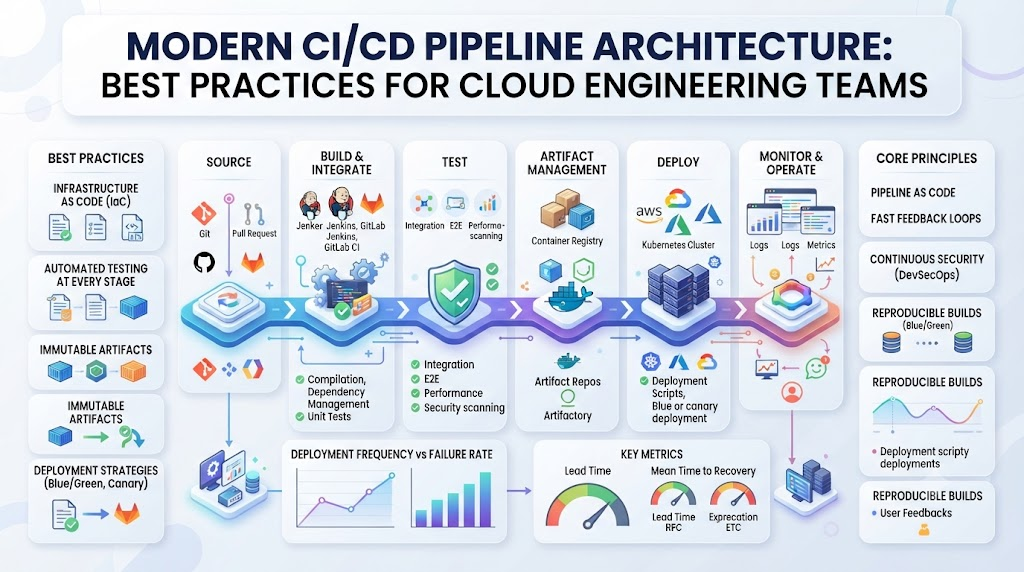
A production-grade pipeline is organized into distinct stages. Each stage acts as a quality gate, ensuring that broken code is caught and rejected as early in the cycle as possible.
+-------------------------------------------------------------+
|                     Source Stage (Git)                      |
|              Push / Pull Request / Merge Event              |
+------------------------------+------------------------------+
                               |
                               v
+-------------------------------------------------------------+
|                         Build Stage                         |
|        Compile Code, Pull Dependencies, Build Artifacts     |
+------------------------------+------------------------------+
                               |
                               v
+-------------------------------------------------------------+
|                         Test Stage                          |
|         Unit Tests, Integration Tests, Linting, SAST        |
+------------------------------+------------------------------+
                               |
                               v
+-------------------------------------------------------------+
|                        Package Stage                        |
|       Build Docker Image, Scan Vulnerabilities, Push to ECR |
+------------------------------+------------------------------+
                               |
                               v
+-------------------------------------------------------------+
|                        Deploy Stage                         |
|   Staging Deployment -> Verification -> Production Release  |
+-------------------------------------------------------------+
1. Source and Trigger Stage
The pipeline begins in your version control system, such as GitHub, GitLab, or Bitbucket. Webhooks monitor repository events like commits, pull requests, and Git tags. When an event matches predefined pipeline triggers, the CI runner initializes an execution context.
2. Build Stage
The build agent pulls clean source code and downloads required dependencies. For compiled languages such as Go, Java, or C#, the pipeline compiles the application. For interpreted languages like Node.js or Python, it installs dependencies, validates configurations, and prepares execution assets.
3. Automated Testing Stage
Code quality verification occurs in parallel or sequential test jobs:
- Linting and Formatting: Enforces code standards and catches common syntax oversights.
- Unit Tests: Validates individual functions and modules in complete isolation.
- Integration Tests: Tests interactions between application components, databases, or mock third-party APIs.
- Static Application Security Testing (SAST): Scans source code for hardcoded secrets, injection vulnerabilities, and insecure dependencies.
4. Artifact Packaging and Storage
Once the build passes all checks, the pipeline packages the application into an immutable artifact. In modern cloud workflows, this artifact is typically an OCI-compliant container image built using Docker. The image is tagged with the unique Git commit hash and pushed to a secure registry, such as Amazon Elastic Container Registry (ECR), Google Artifact Registry, or Azure Container Registry.
5. Deployment Stage
The deployment phase applies changes to runtime infrastructure. This can involve updating an AWS ECS service, applying a Kubernetes deployment manifest, or executing a rolling update across a pool of virtual machines. Mature workflows run automated smoke tests immediately following deployment to verify service health before shifting end-user traffic.
Deployment Strategies: Minimizing Production Downtime
Deploying code directly over a running application causes connection drops and potential downtime. Production delivery pipelines rely on progressive deployment strategies to roll out updates safely.
Rolling Deployments
In a rolling deployment, the deployment platform gradually replaces older application instances with new versions across a target cluster. Traffic continues routing to the remaining old instances while new instances boot and pass health checks. If an error occurs during startup, the orchestrator halts the rollout, leaving remaining instances intact.
Blue-Green Deployments
Blue-green deployments maintain two identical production environments. The “Blue” environment runs the active application version handling production traffic. The pipeline deploys the new release to the inactive “Green” environment, where engineers or automated suites run integration tests against real infrastructure. Once verified, the load balancer switches all user traffic from Blue to Green. If issues surface, traffic can be redirected back to Blue instantly.
Canary Deployments
Canary releases expose a small percentage of real production traffic—typically 2% to 5%—to the new version while the remainder runs on the stable release. The platform continuously monitors application metrics, error rates, and response latencies. If the canary environment demonstrates healthy metrics over a defined window, the pipeline automatically routes increasing traffic to the new version until the rollout reaches 100%.
Core Technologies in the CI/CD Ecosystem
Building an automated pipeline requires selecting tools that integrate cleanly with your development framework and cloud infrastructure.
+-------------------+---------------------------------------------------+
| Category          | Common Industry Tools                             |
+-------------------+---------------------------------------------------+
| CI/CD Platforms   | GitHub Actions, GitLab CI/CD, Jenkins, CircleCI   |
| GitOps & CD       | Argo CD, Flux CD, Spinnaker                       |
| Containerization  | Docker, containerd                                |
| Orchestration     | Kubernetes, Amazon EKS, AWS ECS, Azure AKS        |
| IaC Integration   | Terraform, OpenTofu, AWS CloudFormation, Ansible  |
| Security & SAST   | SonarQube, Trivy, Snyk, Gitleaks                  |
| Monitoring & APM  | Prometheus, Grafana, Datadog, AWS CloudWatch      |
+-------------------+---------------------------------------------------+
GitHub Actions and GitLab CI/CD
Modern teams often prefer integrated solutions like GitHub Actions or GitLab CI/CD because they keep workflow definitions close to source code. Workflows are defined using declarative YAML files stored directly in the repository. These platforms offer managed runners, support self-hosted execution agents within private cloud networks, and feature large ecosystems of reusable actions.
Jenkins
Jenkins remains an established, open-source automation server across enterprise environments. It provides extensive customization through its vast plugin ecosystem. However, Jenkins requires dedicated infrastructure maintenance, regular security patching, and ongoing administrative overhead compared to modern hosted options.
Argo CD and GitOps
For teams running containerized workloads on Kubernetes, GitOps represents a major architectural evolution in Continuous Delivery. Tools like Argo CD operate as controllers inside the Kubernetes cluster. Instead of an external CI runner pushing changes via cluster credentials, Argo CD continuously monitors a Git repository containing declarative manifests. When engineers merge configuration changes to Git, Argo CD detects the divergence and synchronizes the cluster state automatically.
Infrastructure as Code (IaC) in Pipeline Workflows
A reliable CI/CD pipeline does not stop at application code; it also manages the infrastructure supporting that application. Infrastructure as Code (IaC) tools like Terraform and OpenTofu allow teams to define networks, databases, compute clusters, and load balancers as version-controlled code.
Developer Pull Request (Infra Change)
                 |
                 v
        CI Pipeline Triggers
                 |
                 +---> Runs `terraform fmt` (Formatting)
                 +---> Runs `tflint` (Static Analysis)
                 +---> Runs `checkov` (Security & Compliance)
                 +---> Runs `terraform plan` (Execution Diff)
                 |
                 v
   Pull Request Comment with Plan Output
                 |
                 v
    Peer Review & Senior SRE Approval
                 |
                 v
       Merge to Main Branch
                 |
                 v
  Pipeline Runs `terraform apply` via IAM Role
Integrating Terraform into a pipeline requires strict safeguards:
- Automated Planning: When an engineer creates an infrastructure pull request, the CI runner executes
terraform planand posts the predicted resource diff directly into the pull request comments. - Review and State Locking: Senior engineers review the resource modifications before approving the merge. Terraform remote state locks prevent concurrent runs from corrupting backend state files in cloud object storage.
- Automated Application: Upon merge, the pipeline assumes a scoped cloud IAM role via OpenID Connect (OIDC) and runs
terraform apply, ensuring infrastructure updates are executed from a single, auditable location rather than individual laptops.
Security and DevSecOps: Guarding the Pipeline
Pipelines hold extensive permissions across source code, container registries, and cloud hosting accounts. If left unsecured, an automated pipeline can become a primary vector for supply chain attacks. Implementing practical DevSecOps controls is essential for any production delivery system.
Eliminating Long-Lived Cloud Credentials
Storing permanent cloud access keys (such as AWS access key pairs) in pipeline secret stores presents severe security risks if runners are compromised. Modern cloud platforms support identity federation using OpenID Connect (OIDC). With OIDC, CI platforms like GitHub Actions or GitLab CI exchange short-lived JSON Web Tokens (JWT) for temporary, role-based cloud credentials, removing static secrets from the delivery pipeline entirely.
Automated Secrets Scanning
Engineers occasionally commit API keys, database connection strings, or private SSH keys by accident. Integrating tools like Gitleaks or TruffleHog into the pre-commit and early CI stages detects and halts builds containing sensitive credentials before code integrates into shared branches.
Container Image Vulnerability Scanning
Applications rely heavily on open-source dependencies and base OS images that contain known vulnerabilities (CVEs). Adding scanning utilities such as Trivy or Snyk allows the pipeline to inspect base images, runtime packages, and external libraries. Teams can configure pipelines to fail builds if high- or critical-severity vulnerabilities without available fixes are detected.
Common CI/CD Implementation Challenges and How to Solve Them
Building an automated pipeline involves operational hurdles that can slow development if not handled correctly.
+---------------------------+-----------------------------------+-----------------------------------------+
| Challenge                 | Root Cause                        | Practical Engineering Solution          |
+---------------------------+-----------------------------------+-----------------------------------------+
| Slow build times (>20m)   | Cold caches and serial execution  | Layer caching, dependency mounts, jobs  |
| Flaky pipeline failures   | Unstable integration tests        | Isolate external mocks, retry policies  |
| "Works on my machine"     | Divergent local vs CI runners     | Standardize containerized environments  |
| Secret leaks in artifacts | Baked env variables in layers     | Multi-stage Docker builds, Secret stores|
+---------------------------+-----------------------------------+-----------------------------------------+
1. Slow Build and Execution Times
As test suites grow, pipeline runs can stretch to 30 or 40 minutes, bringing development velocity to a crawl.
- Solution: Implement intelligent dependency caching for package managers (such as npm, Maven, or pip) and use Docker layer caching. Split test suites into parallel execution jobs across multiple runner instances. Break monolithic builds into modular microservice pipelines that only trigger when changes occur within specific directories.
2. Flaky Test Suites
Tests that pass and fail unpredictably erode team trust in pipeline automation. Developers start ignoring build failures, assuming the infrastructure is at fault rather than their code.
- Solution: Quarantine flaky tests into a separate non-blocking test run until developers stabilize them. Replace brittle end-to-end tests that hit live external web services with deterministic integration tests utilizing mocked dependencies and containerized local databases.
3. Drift Between Staging and Production
If staging environments are maintained manually while production relies on automated deployments, releases will fail during promotion due to unexpected configuration discrepancies.
- Solution: Manage all application environments using identical declarative templates. Ensure staging and production use the exact same immutable container images, altering only runtime environment variables and secrets via centralized parameter stores.
When to Hire a DevOps Freelancer for Pipeline Engineering
Not every company needs an immediate full-time platform engineering team. Early-stage startups, expanding SaaS companies, and businesses modernizing legacy setups often need specialized engineering expertise for specific, high-impact projects.
+------------------------------------+------------------------------------+
| Work with a DevOps Freelancer      | Hire a Full-Time In-House Engineer |
+------------------------------------+------------------------------------+
| Greenfield CI/CD pipeline setup    | Managing large-scale infra 24/7    |
| Migrating pipelines to new tools   | Building custom internal platforms |
| Implementing Kubernetes/GitOps     | Extensive day-to-day triage        |
| Cloud cost & build optimization    | Permanent organizational ownership |
| Short-to-medium term initiatives   | Deep internal cross-team training  |
+------------------------------------+------------------------------------+
Hiring an external specialist makes sense when:
- Your software developers spend significant hours each sprint debugging builds and performing manual releases.
- Your engineering team is migrating from virtual machine hosting to Kubernetes and requires production-grade deployment manifests and Helm charts.
- You need to integrate automated security scanning, policy-as-code, and compliance controls to satisfy SOC 2 or ISO 27001 requirements.
- Legacy Jenkins instances suffer from dependency conflicts, lack documentation, and regularly block daily feature delivery.
What to Look for in a Specialist
When evaluating candidates, look beyond simple tool checklists. A capable freelance DevOps engineer should demonstrate strong production experience, an understanding of zero-downtime deployment patterns, and disciplined documentation habits.
Depending on your cloud environment and architecture, you may look for specialists across targeted skill sets:
- AWS DevOps Freelancer: Deep proficiency in AWS CodePipeline, EKS, ECS, CloudWatch, and IAM permissions architectures.
- Kubernetes Freelancer: Practical knowledge of Helm, Kustomize, cluster networking, rolling upgrades, and GitOps tools like Argo CD.
- Terraform Freelancer: Experience with reusable module design, state management, drift detection, and secure pipeline execution.
- DevSecOps Freelancer: Specialization in pipeline security hardening, container scanning, OIDC cloud federation, and secrets lifecycle management.
For businesses looking to source vetted cloud talent across these domains, exploring specialized networks like DevOpsFreelancer.com provides access to experienced contractors who can audit existing deployment setups, automate release pipelines, and train internal teams.
Key Mistakes to Avoid When Building Pipelines
Even experienced engineering teams can fall into habits that undermine their delivery automation.
- Treating CI/CD as an Afterthought: Trying to bolt a delivery pipeline onto an application just days before an enterprise launch leads to fragile, rushed automation. Design release workflows alongside core application architecture.
- Hardcoding Secrets in Workflow Files: Committing environment variables containing database passwords, API tokens, or encryption keys directly into YAML files introduces major vulnerabilities. Always use your CI tool’s native encrypted secret store or an external manager like AWS Secrets Manager or HashiCorp Vault.
- Ignoring Pipeline Logs and Telemetry: Pipelines are critical production systems. If builds fail silently or take increasingly longer to finish without visibility, delivery velocity stalls. Export pipeline metrics to dashboards to track mean time to build, failure rates, and deployment frequencies.
- Granting Full Cloud Admin Rights to Runners: Giving a CI/CD runner unlimited administrator access to an AWS or Azure account creates serious security exposure. Follow the principle of least privilege: give the runner permissions to update only the specific compute resources, container repositories, and storage buckets required for that deployment.
- Neglecting Rollback Automation: Every automated deployment process must include an equally automated rollback mechanism. If an application fails health checks post-deployment, the pipeline should revert traffic to the previous known good artifact without requiring manual intervention from engineers.
Practical Tips for Implementation
- Start simple: Begin by automating basic builds, linting, and unit tests on pull requests before attempting fully automated production deployments.
- Keep builds fast: Aim for a total pull-request feedback loop under 10 minutes. If builds take longer, developers will context-switch and productivity drops.
- Use immutable artifacts: Never rebuild code between staging and production. Build a container image once, test it thoroughly, and promote that exact image through your environments.
- Version control everything: Store pipeline configurations as declarative code directly in the application repository (
.github/workflows,.gitlab-ci.yml), keeping configuration changes versioned alongside source code. - Automate environment cleanups: If your pipeline provisions ephemeral preview environments for pull requests, ensure automated cleanup hooks destroy these cloud resources when pull requests close to prevent unnecessary cloud spending.
Frequently Asked Questions (FAQs)
What is the difference between Continuous Delivery and Continuous Deployment?
Continuous Delivery automates code compilation, testing, and staging deployments, but requires a manual approval step before releasing changes to production. Continuous Deployment removes that manual gate completely: every change that passes all automated tests and quality checks deploys directly to production environments automatically.
Which CI/CD platform is best for a small startup?
Hosted platforms like GitHub Actions or GitLab CI/CD are generally best for startups. They eliminate server maintenance overhead, integrate directly with your code repository, offer generous free usage tiers, and allow teams to define automated pipelines using clean declarative YAML without configuring dedicated infrastructure.
How does a CI/CD pipeline interact with Kubernetes?
A pipeline builds application source code into a container image, scans it for security issues, pushes it to an image registry, and updates Kubernetes deployment manifests with the new image tag. Advanced setups use GitOps tools like Argo CD, which pull these updates into the cluster automatically.
Why should our team use OpenID Connect (OIDC) instead of static cloud credentials?
Static credentials, such as IAM user access keys stored in pipeline settings, never expire unless manually rotated and risk leaking during builds. OIDC enables your CI/CD runner to authenticate directly with your cloud provider using short-lived, automatically rotated identity tokens, significantly reducing security exposure.
When should a company consider hiring a freelance DevOps engineer?
A company should consider hiring a freelance DevOps engineer when they need specialized skills to design an initial pipeline, migrate away from legacy tools, optimize slow builds, or automate infrastructure without the extended time and overhead required to recruit a full-time, permanent engineer.
Can Infrastructure as Code (IaC) be automated through a CI/CD pipeline?
Yes. Teams frequently run Terraform or OpenTofu within pipelines. Workflows execute terraform plan during pull request reviews so engineers can inspect infrastructure changes before merging, and terraform apply executes automatically upon merging to update cloud environments consistently.
What are the most critical metrics for measuring CI/CD pipeline health?
Key pipeline metrics include build duration (how fast the pipeline runs), deployment frequency (how often code reaches production), change failure rate (percentage of releases causing incidents), and Mean Time to Recovery (MTTR, how quickly the team restores service after an operational failure).
How do we keep test suites from making our deployment pipeline too slow?
You can speed up pipelines by executing unit, integration, and security tests in parallel rather than sequentially. Caching package dependencies between runs, optimizing container base layers, and isolating slow end-to-end browser tests into scheduled nightly jobs also helps maintain rapid daily deployment cycles.
What access permissions should an automated deployment runner have?
Runners should operate under the principle of least privilege. They must only possess permissions to access specific target environments, push to designated container repositories, and trigger updates on targeted compute resources. They should never be granted root or broad account administrator privileges.
How does a CI/CD pipeline handle database schema migrations safely?
Pipelines run schema migrations using automated migration tools prior to routing traffic to new application instances. Safe database migrations must always be backward-compatible, ensuring the active, older version of the application continues functioning properly while the new application version completes its rollout.
Conclusion
A well-architected CI/CD pipeline transforms software delivery from a risky, manual task into a reliable competitive advantage. By automating testing, securing container builds, and standardizing zero-downtime deployment patterns, engineering teams ship features faster with fewer production incidents. Building this foundation requires thoughtful architectural decisions around tooling, testing performance, and cloud security controls. Whether you build these capabilities internally or collaborate with experienced specialists via platforms like DevOpsFreelancer.com, investing in reliable release automation is essential for scaling modern cloud software.
Leave a Reply